.png?width=100&height=75&name=Untitled%20design(1).png)
Accessing the platform and personal reports
To access the mentoring platform, navigate to
https://pushfar.app and enter your username and password.
Once you have logged in, navigate to Reports from the navigation toolbar in the top-right corner of your homepage.
Report Page overview
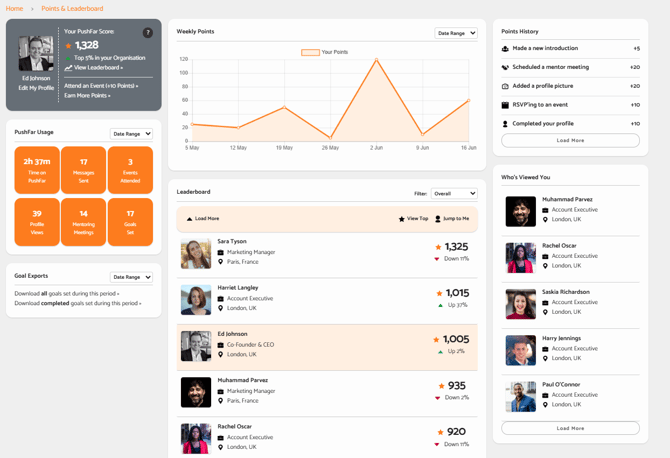
From here, you can review key personal information, including profile stats, usage stats, and profile views.
Additionally, your Program Admin may have enabled features that allow you to earn points through engagement.
Earn points though engagement
If enabled, you will be able to earn points by scheduling meetings, updating your profile, or attending events. You will also be able to view your points history and see where you rank on the leaderboard from the same Reports page.
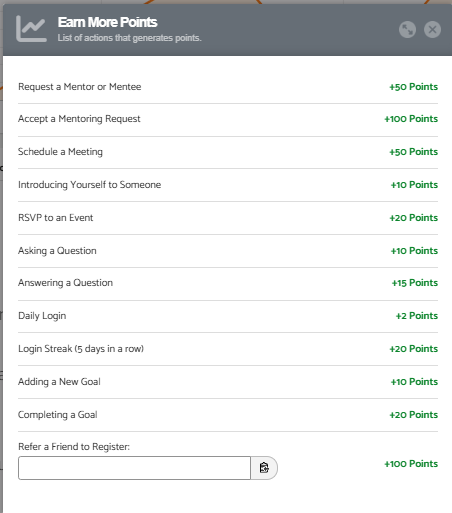
Below are examples of ways you can earn points.
Please note:
This feature may have been disabled or adjusted by your organisation’s administrator. Points may vary depending on your organisation’s configuration.