.png?width=100&height=75&name=Untitled%20design(1).png)
Overview
If you need help using PushFar, experiencing a technical issue, or have questions about platform functionality, the PushFar Support Team is here to help.
You can access support resources directly from within the platform, including Knowledge Base articles, troubleshooting guides and options for contacting support.
Before contacting support, it is worth checking whether your question relates to the PushFar platform itself or your organisation's mentoring program, as some enquiries may be best directed to your Program Administrator.
Accessing Support
To access PushFar support:
- Sign in to your PushFar account via PushFar.
- Navigate to your dashboard.
- Select the Support button located at the bottom-right corner of any page.
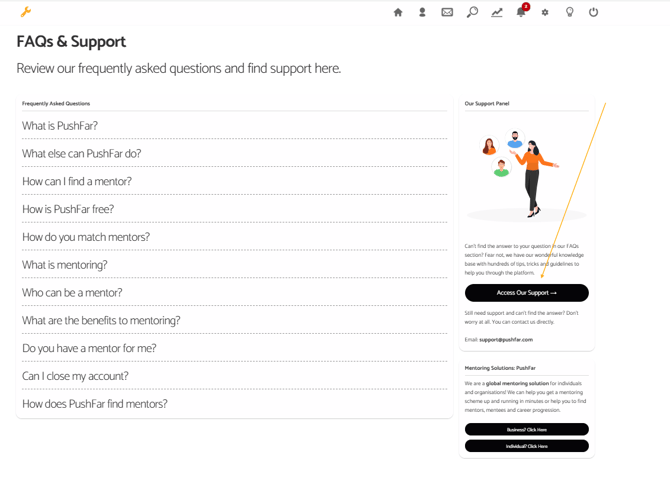
You will then see the FAQs & Support area.
From here, you can:
- Browse Knowledge Base articles
- View frequently asked questions
- Access support resources
- Create a support ticket
- Contact the PushFar Support Team
Select Access Our Support to view the available support options.
Contacting the Support Team
If you cannot find the answer you need in the Knowledge Base, you can contact the PushFar Support Team directly.
📧 Email: support@pushfar.com
When raising a support request, providing as much information as possible will help us investigate and resolve your issue more quickly.
Information to Include in Your Support Request
Your Account Details
Please include:
- Your full name
- The email address (username) you use to sign in to PushFar
- The organisation or mentoring program you belong to
- Whether you are a mentor, mentee or both
Details of the Issue
Please tell us:
- What you were trying to do
- What happened
- What you expected to happen
- Whether the issue occurs every time or only occasionally
- The date and approximate time the issue occurred
Screenshots and Error Messages
Including screenshots can significantly speed up the investigation process.
Where possible, provide:
- Screenshots of the issue
- Screenshots of any error messages
- A screenshot showing the full browser window, including the URL/address bar
- The exact wording of any error messages
- Steps taken before the issue occurred
This information helps us identify where in the platform the issue is occurring and investigate more efficiently.
Device and Browser Information
If the issue relates to the website or mobile experience, please let us know:
- The device you are using
- Your browser (Chrome, Edge, Firefox, Safari, etc.)
- Whether the issue occurs on multiple devices or browsers
What PushFar Support Can Help With
The PushFar Support Team can assist with:
- Bugs and unexpected behaviour
- Login and password issues
- Account access problems
- Platform errors and technical issues
- Messaging and meeting functionality
- Notification issues
- Resource access issues
- General platform guidance
When to Contact Your Program Administrator
Some questions are specific to the mentoring program run by your organisation and will need to be handled by your Program Administrator rather than PushFar Support.
Examples include:
- Questions about program eligibility
- Requests to join a mentoring program
- Mentoring program rules or policies
- Mentor or mentee approval processes
- Administrator-enabled mentor and mentee matching decisions
- Requests to amend, review or change mentor/mentee matches
- Internal training materials or resources
- Organisation-specific mentoring requirements
- Requests for access to organisation-only content
Your Program Administrator will generally be best placed to answer questions about how your organisation's mentoring program operates.
Before Contacting Support
You may be able to find an immediate answer by:
- Reviewing the Knowledge Base articles
- Checking the FAQs section
- Viewing any program resources available to you
- Speaking with your Program Administrator for organisation-specific questions
Tip: If you're unsure who to contact, feel free to email PushFar Support. We'll do our best to point you in the right direction.
Response Times
Our support team aims to respond to all enquiries as quickly as possible.
Providing clear information, screenshots and details about the issue in your initial email will help us investigate and resolve your query more efficiently.
Need Help?
If you require assistance with the PushFar platform, please contact the team at support@pushfar.com.
For questions relating to your organisation's mentoring program, resources, policies, participant management or mentor/mentee matching, please contact your Program Administrator in the first instance.
The more information you can provide, the faster we can help get you back on track.