.png?width=100&height=75&name=Untitled%20design(1).png)
Overview
The Resources area provides mentors and mentees with access to helpful materials that support their mentoring journey.
Depending on your organisation's programme configuration, resources may include:
- Mentor guides
- Mentee guides
- FAQs
- Worksheets and templates
- Video training content
- Career development resources
- Organisation-specific documents
- External links and articles
Please note: The Resources section is optional and may not be available on all programmes. Resources are managed by your programme administrator, so the content available to you may differ from the examples shown in this article.
How to Access Resources
To view resources available to you:
- Sign in to your PushFar account at PushFar.
- Navigate to your dashboard.
- Select the Resources icon located in the top-right corner of the platform.
You will then be taken to the Organisation Resources page.
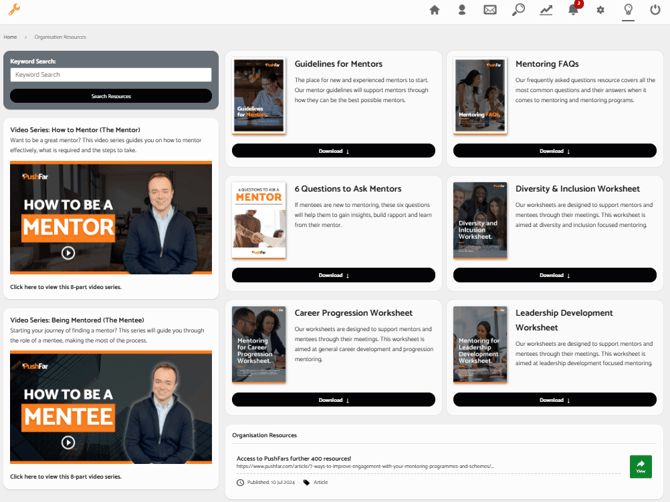
Viewing Available Resources
The Resources page displays all content that has been made available to mentors and mentees within your programme.
Resources may include:
- Downloadable PDFs and guides
- Worksheets and templates
- Videos and training materials
- Articles and external resources
- Organisation-specific documentation
Simply select the relevant resource to view or download it.
Searching for Resources
If your programme contains a large library of resources, you can use the Keyword Search box to quickly find relevant content.
To search for resources:
- Enter a keyword or phrase into the search box.
- Select Search Resources.
- Browse the matching results.
For example, you may search for terms such as:
- Mentor
- Mentee
- Goals
- Career Development
- Leadership
- Inclusion
Video Resources
Your organisation may provide video content to help support mentors and mentees.
These resources may include:
- How to be a Mentor
- How to be a Mentee
- Programme onboarding videos
- Skills development content
- Best practice guidance
Simply select the video to begin watching.
Downloading Resources
Many resources can be downloaded directly from the platform.
To download a resource:
- Locate the resource you would like to access.
- Select the Download button.
- Save the file to your device.
You can then view the resource offline whenever needed.
Organisation-Specific Resources
Some organisations choose to provide their own resources alongside PushFar's standard content.
These might include:
- Programme handbooks
- Internal mentoring guidance
- Training materials
- Policies and procedures
- Additional learning resources
As a result, the resources available within your programme may differ from those available to users in other organisations.
Can't See the Resources Section?
If you cannot see the Resources icon or there are no resources available, this may mean:
- Resource access has not been enabled for your programme
- No resources have been published yet
- Your access permissions have changed
If you believe resources should be available, please contact your programme administrator or the PushFar Support Team.
Need Further Help?
If you're having trouble accessing or downloading resources, please contact the PushFar Support Team at support@pushfar.com.
The team can assist with:
- Accessing resources
- Download issues
- Missing content
- Platform navigation
- General programme support
We're always happy to help you get the most from your PushFar experience.