.png?width=100&height=75&name=Untitled%20design(1).png)
Accessing FAQs & Support Overview
The FAQs & Support section provides quick answers to common questions about using PushFar, mentoring, account management and platform features.
If you're part of an organisation's mentoring programme, your programme administrator may add organisation-specific FAQs or hide certain standard PushFar FAQs. As a result, the content displayed may differ between programmes.
How to Access FAQs & Support
To access the FAQs & Support area:
- Sign in to your PushFar account via PushFar.
- Once logged in, navigate to your dashboard.
- Select the Support button located at the bottom-right of the page.
You will then be taken to the FAQs & Support page.
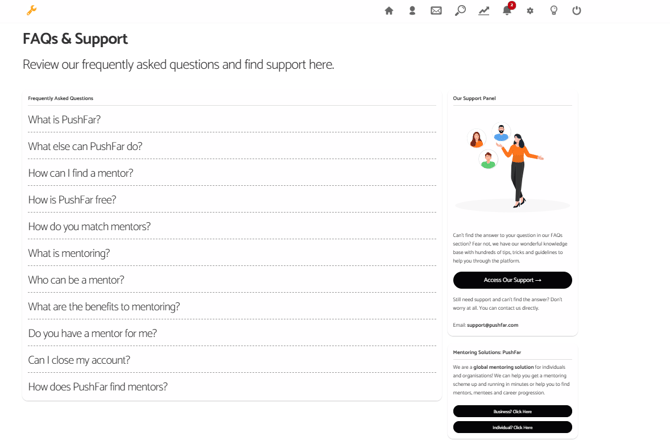
What You'll Find in the FAQs Section
The FAQs & Support area contains answers to commonly asked questions about:
- PushFar and mentoring
- Finding a mentor or mentee
- Mentoring best practices
- Platform features and functionality
- Account management
- General support enquiries
The exact FAQs displayed may vary depending on your organisation's settings.
Please note: Your programme administrator can add their own FAQs and support content, meaning your FAQs page may look different from examples shown in the Knowledge Base.
Additional Support Resources
Alongside the FAQ list, you'll find access to:
- PushFar support resources
- Knowledge Base articles
- Additional guidance and help materials
- Contact information for the PushFar Support Team
You can select Access Our Support to browse further help articles and platform guidance.
Still Need Help?
If you cannot find the answer to your question in the FAQs section, please contact the PushFar Support Team by emailing support@pushfar.com.
The team can assist with:
- Account issues
- Platform navigation
- Mentoring programme questions
- Technical problems
- General support enquiries
We're always happy to help you get the most from your PushFar experience.